---
title: How to Create an Instant Mockup Using Preview Tool?
description: This article explains the procedure to create an instant mockup using the Preview Tool in Nova UI. Note: The preview URL can be shared with external stakeholders. See Example. Requests for creative
---
[Skip to content](https://help.novastudio.ai/preview-tool-nova#main-content)
[Ad Creative Build Request](https://help.novastudio.ai/kb-tickets/new?hsLang=en)
[](https://createwithnova.wiki/)
- [Login](https://create.novastudio.ai)
Open main navigation
Close main navigation
- [Login](https://create.novastudio.ai)
- [Ad Creative Build Request](https://help.novastudio.ai/kb-tickets/new)
- [Login](https://createwithnova.io/)
[Login](https://createwithnova.io/)
How can we help?
- There are no suggestions because the search field is empty.
1. [Nova Wiki](https://help.novastudio.ai/?hsLang=en)
2. [Display](https://help.novastudio.ai/display?hsLang=en)
3. [Create Ad](https://help.novastudio.ai/display?hsLang=en#create-ad)
# How to Create an Instant Mockup Using Preview Tool?
## This article explains how to create an instant mockup using the Preview Tool in Nova Studio.
### What Is the Preview Tool?
The Preview Tool lets you generate an instant mockup from any public social post into a Nova Studio ad. Use it to quickly visualize how your creative will appear across different ad formats before building your campaign.
💡 Prefer a video walkthrough? Watch a 1-minute video tutorial on how to use the Preview Tool below.
---
### How to Create an Instant Mockup
1. Navigate to the [Preview Tool](http://createwithnova.io/preview/nova)
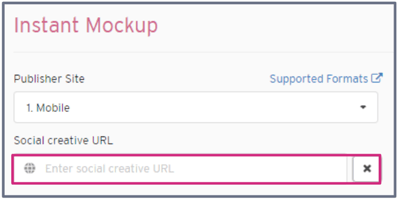
2. Copy and paste any **public social post URL** into the Social Creative URL field. See below for any restrictions.
****
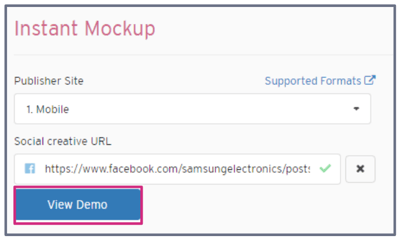
3. Wait for the creative to load, then click **View Demo.**
4. Optional: Click See **All Nova Formats** to explore all the ad formats your social post can be adapted into.
💡[Learn](https://help.novastudio.ai/copy-social-post-urls?hsLang=en) how to copy a social post URL from each supported platform.
---
### Why Is My Preview Not Generating?
If your preview isn't generating, your post may contain one of the following unsupported platforms or post types:
Unsupported platforms
- Pinterest
- Snapchat
- X
- Threads
Unsupported post types
- Age-restricted posts (e.g. alcohol brands)
- Geo-restricted posts
- Private posts
If your post still doesn't generate a preview, our team can create the mockup for you. Submit a request [here.](https://www.socialdisplay.partners/request?__hstc=133303313.508091e67620c2d4a8fa265009abb31c.1767805809001.1775571328779.1775577143780.16&__hssc=133303313.5.1775577143780&__hsfp=31489afb8b64f08cdd13f3f04fefa1df)
- [User Management](https://help.novastudio.ai/user-management?hsLang=en)
- [Display](https://help.novastudio.ai/display?hsLang=en#main-content)
- [Setup & Basics](https://help.novastudio.ai/display?hsLang=en#setup-basics)
- [Create Ad](https://help.novastudio.ai/display?hsLang=en#create-ad)
- [Ad Formats & Capabilities](https://help.novastudio.ai/display?hsLang=en#ad-formats-capabilities)
- [Features](https://help.novastudio.ai/display?hsLang=en#features)
- [Import & Download](https://help.novastudio.ai/display?hsLang=en#import-download)
- [Troubleshoot](https://help.novastudio.ai/display?hsLang=en#troubleshoot)
- [VAST Video](https://help.novastudio.ai/vast-video?hsLang=en#main-content)
- [Setup & Basics](https://help.novastudio.ai/vast-video?hsLang=en#setup-basics)
- [Ad Formats](https://help.novastudio.ai/vast-video?hsLang=en#ad-formats)
- [Features](https://help.novastudio.ai/vast-video?hsLang=en#features)
- [Activation](https://help.novastudio.ai/vast-video?hsLang=en#activation)
- [Trackers](https://help.novastudio.ai/trackers?hsLang=en#main-content)
- [Add & Manage](https://help.novastudio.ai/trackers?hsLang=en#add-manage)
- [Guidelines](https://help.novastudio.ai/trackers?hsLang=en#guidelines)
- [Reporting](https://help.novastudio.ai/reporting?hsLang=en#main-content)
- [Access & Export](https://help.novastudio.ai/reporting?hsLang=en#access-export)
- [Metrics & Discrepancies](https://help.novastudio.ai/reporting?hsLang=en#metrics-discrepancies)
- [Trafficking Guidelines](https://help.novastudio.ai/trafficking-guidelines?hsLang=en)
- [Best Practices](https://help.novastudio.ai/best-practices?hsLang=en)
- [Native Ads](https://help.novastudio.ai/native-ads?hsLang=en)
- [Case Studies](https://help.novastudio.ai/case-studies?hsLang=en)
[](http://www.novastudio.ai?hsLang=en)
[support@novastudio.ai](mailto:support@createwithnova.com)
```
```
Copyright © 2026, Nova
```json
{
"@context" : "https://schema.org",
"@type" : "VideoObject",
"contentUrl" : "https://4934439.fs1.hubspotusercontent-na1.net/hubfs/4934439/Instand%20Mockup%20using%20the%20preview%20tool%20FINAL.mp4",
"dateModified" : "2023-06-30T22:31:22.972Z",
"duration" : "PT1M12.5S",
"height" : 720,
"name" : "Instand Mockup using the preview tool FINAL",
"thumbnailUrl" : "https://4934439.fs1.hubspotusercontent-na1.net/hubfs/4934439/Instand%20Mockup%20using%20the%20preview%20tool%20FINAL.mp4/medium.jpg",
"uploadDate" : "2023-06-30T22:31:15.341Z",
"width" : 1280
}
```