
Download the PDF on Display best practices here.
Table of Contents:
Supply and Inventory
Pro tip: All of Nova's Display creative formats are supported in all available exchanges/SSPs.
Nova's fixed sized display formats perform poorer than Nova's Flex sized display formats. We recommend avoiding supply sources that predominately load Nova's fixed sized ads.
Supply Sources
- Avoid GAM SSP (Google Ad Manager supply) if possible, because Nova Social Display ads are incapable of resizing in this supply. They instead render in fixed-size formats. Ad performance may be slightly lower for these markets compared to other exchanges/SSPs.
- Avoid Teads TV and Magnite CTV public inventory since these are not appropriate supply sources for display.
Supported Environments
We support all display environments (i.e., web and native app).
Pro Tip: Mobile and Tablet Web Environments generally show the best performance because users are most familiar with social formats on a mobile device.
Sizes
Make sure to use all 4 supported sizes for Nova Social Display Creatives. Make copies of the same Nova creative in your DSP and set them up for all 4 supported sizes below. You can use the same ad tag across all sizes. This opens up more inventory.
- Include:
- 300x250 (Medium Rectangle)
- 336x280 (Large Rectangle)
- 300x600 (Half Page)
- 320x480 (Mobile Interstitial)
Devices
- Include:
○ Smartphone
○ Tablet
○ Computer (if Desktop Web required - generally Desktop performs slightly poorer than mobile. - Exclude:
○ Connected TV (for display ads)
Viewability
Please ensure to set viewability targeting at 70% or greater.
Position Targeting - Avoid Interstitial placements where possible.
We recommend excluding Interstitial placements for Nova display. Using Interstitial placements may cause Impression count discrepancies.
- Interstitial placements often pre-load the ad tag before an ad is displayed, causing discrepancy issues.
- Interstitial placements are pre-selected by default in DV360. To change this, you'll just need to uncheck "Interstitial" in DV360 when targeting by "Position". In your Insertion order or Line item click ADD TARGETING >> Position and then uncheck "Interstitial". Please refer to the screenshot below:
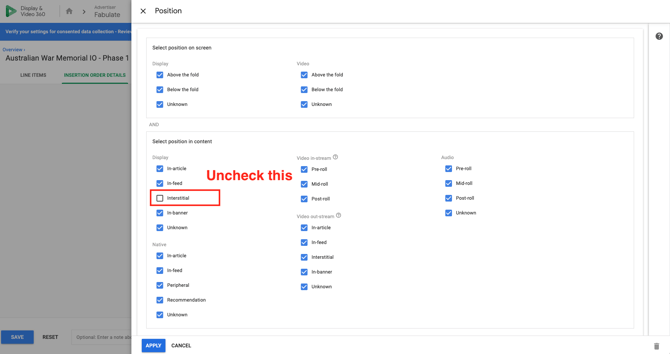
- You should make this change on all Nova campaigns running through DV360.
- In the event you have a requirement to run interstitials or are seeing performance and want to continue running then, please let us know the estimated impressions running so we can be on the lookout for this issue in advance.
Geo Targets
- You may apply any geo-targeting as necessary.
Note: Extremely granular targeting at the city/town level will likely create inventory constraints similar to any display campaign.
Audience Targets
- You may apply any First/Third Party Audience target list you have.
Contextual Targets
- You may apply any contextual targeting available via your DSP/DMP.
Other Guidelines
Creative type
- The Nova Display ad tag should always be uploaded as a “third-party creative” in every DSP.
DV360
- Please refer to DV360 Trafficking Instructions here.
The Trade Desk (TTD)
- Please refer to The Trade Desk Trafficking Instructions here.
Xandr
- Please refer to Xandr Trafficking instructions here
Note: Nova CPM fees are still invoiced separately
Note: Copying tags from spreadsheets
When copying ad tags from Excel sheets or other spreadsheets, you should double-click the cell and select the text within the cell. If you select the cell and copy, then the ad tags are corrupted with extra double quotes. This will cause blank ads to render – so there would be no clicks recorded.
We highly recommend using the Nova “Copy to Clipboard” button when copying tags from the Ad tag page, for trafficking. Alternatively, you can even use our “Share Link” button also found in the Ad tag page.
Best Practices
Once the campaign is live, review the tips outlined here - Campaign/Creative Performance Optimization Tips and Tricks
Troubleshooting Tips
If the DSP or ad server (e.g. Campaign Manager360)is not registering any impressions, please contact support@novastudio.ai with the following information:
- Copy the ad tag from the DSP and paste it into a text file and send to as attachment. Or copy/paste the ad tag as email copy.
- Take screenshots of the Campaign and Creative configuration pages in the DSP showing the tag as pasted/setup in the DSP.
- Attach any third party impression trackers if they are not tracking impressions.