---
title: How to Add a Creative via Manual Asset Upload
description: "Download One Pager Info about adding a creative via manual asset upload here Check this tutorial video on how to add a creative to a campaign via manual asset upload method Note: The Landing Page"
---
[Skip to content](https://help.novastudio.ai/nova-manualasset#main-content)
[Ad Creative Build Request](https://help.novastudio.ai/kb-tickets/new?hsLang=en)
[](https://createwithnova.wiki/)
- [Login](https://create.novastudio.ai)
Open main navigation
Close main navigation
- [Login](https://create.novastudio.ai)
- [Ad Creative Build Request](https://help.novastudio.ai/kb-tickets/new)
- [Login](https://createwithnova.io/)
[Login](https://createwithnova.io/)
How can we help?
- There are no suggestions because the search field is empty.
1. [Nova Wiki](https://help.novastudio.ai/?hsLang=en)
2. [Display](https://help.novastudio.ai/display?hsLang=en)
3. [Setup & Basics](https://help.novastudio.ai/display?hsLang=en#setup-basics)
# How to Add a Creative via Manual Asset Upload
Download One Pager Info about adding a creative via manual asset upload [here](https://help.novastudio.ai/hubfs/Manual%20Asset%20Upload.pdf?hsLang=en)
---
Check this tutorial video on how to add a creative to a campaign via manual asset upload method
### Which post requires manual assets upload?
- **Non-Public posts** from Facebook, Instagram, TikTok and X (formerly Twitter). The Public posts from Facebook, Instagram, TikTok, Youtube, X (formerly Twitter) and LinkedIn can be imported via auto-fill.
Public posts are easily accessible to users without the requirement of logging into the social media platform, and they are not restricted by geographic location. To verify this, you can try opening the URL in an Incognito window.
- Any other social post formats (like Pinterest, Snapchat, Threads)
- Posts which are geo-locked, age-restricted (like Alcohol, Gambling, Adult content etc.), sponsored or private
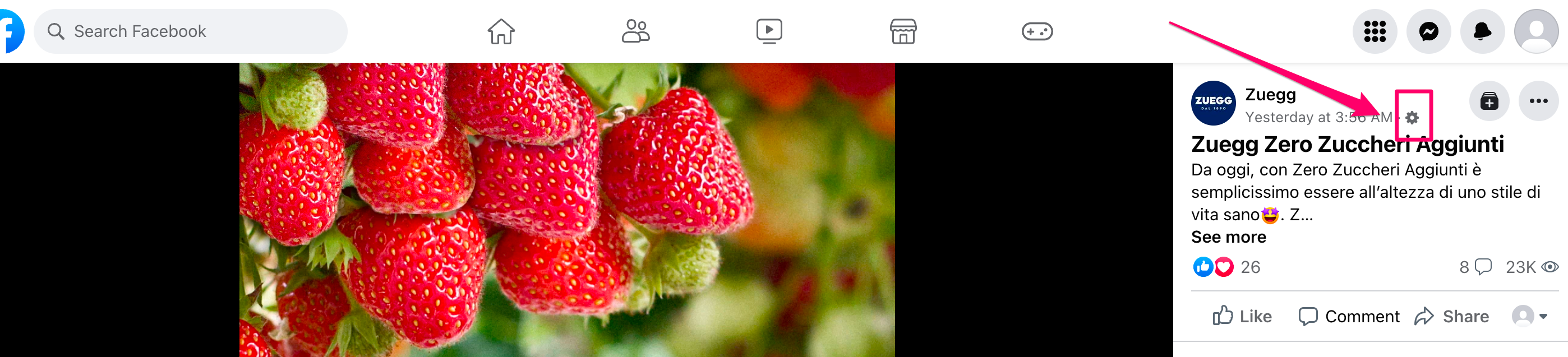
- Posts which have a **Gear Icon** instead of a Globe icon beside the time-stamp indicates that it has some sort of restriction or targeting applied to it. This can be age restriction, geo-restriction etc.
- Posts from a Private Social Media Page
- Posts from a Social Media page which is Geo-restricted (Page having region/country restriction)
- Posts created using Meta/Facebook Ad Manager or Business post from Meta/Facebook Platform
- Posts that have not yet been published on the social media platform
- Posts related to events
Learn more about [Posts That Are Supported and Unsupported via Auto-Fill (One-Click) Import](https://createwithnova.wiki/not-able-to-create-creative)
### How to add creative in Nova UI
- In the Nova UI Dashboard, under any Campaign click on **Add Creative**
*Learn How to create a campaign in Nova UI [Here](https://createwithnova.wiki/nova-createacampaign)*
**-png.png)**
- Click **Add Display Creative-png.png)**
- Click **Create Social Display Ad Manually -png.png)**
- Input the **Creative Name-png.png)**
- Select the **Format Type-png.png)**
- Select the **Social Type-png.png)**
- Input the social media homepage link under **Social Icon-png.png)**
- *Optional:* Input a link for **Social Engagement Buttons** and toggle ON **Verified Badge**-png.png)
- Input a **Caption -** Emojis are fully supported in Caption**-png.png)**
- Input the **Landing Page URL, CTA Button** text and color-png.png)
Note: The **Landing Page URL** describes the location the user will be sent to upon clicking the ad. Any website URL, [Telephone Number, and Email](https://createwithnova.wiki/set-landing-page-telephone-email) can also be added.
- Input the **Brand Name** and **Logo-png.png)**
- Upload the required **Media** asset-png.png)
**Note:** For best image quality, always use PNG format for image files. Convert from JPG to PNG to[Fix Blurry or Pixelated Images](https://createwithnova.wiki/blurry-pixelated-images).
- *Optional:* Input the desired **Click** and **Impression Trackers** along with their **Integration Code-png.png)**
- Click **Save-png.png)**
Learn how to Download [Photos](https://createwithnova.wiki/downloading-an-image) and Videos from [Facebook](https://createwithnova.wiki/download-facebook-videos), [X (formerly Twitter)](https://createwithnova.wiki/download-twitter-videos), [Instagram](https://createwithnova.wiki/download-instagram-videos), [TikTok](https://createwithnova.wiki/download-tiktok-videos), [LinkedIn](https://createwithnova.wiki/download-linkedin-videos), [Youtube](https://createwithnova.wiki/download-youtube-videos), and [Pinterest](https://createwithnova.wiki/download-pinterest-videos).
Learn about Social Display Creative Specifications [here](https://createwithnova.wiki/social-display-creative-specifications)
Learn how to copy or export the creative Ad tag from Nova UI [here](https://createwithnova.wiki/nova-copyadtag)
Having any questions or facing issues in manually uploading assets? Send us your request to [support@createwithnova.com](mailto:support@createwithnova.com)
- [User Management](https://help.novastudio.ai/user-management?hsLang=en)
- [Display](https://help.novastudio.ai/display?hsLang=en#main-content)
- [Setup & Basics](https://help.novastudio.ai/display?hsLang=en#setup-basics)
- [Create Ad](https://help.novastudio.ai/display?hsLang=en#create-ad)
- [Ad Formats & Capabilities](https://help.novastudio.ai/display?hsLang=en#ad-formats-capabilities)
- [Features](https://help.novastudio.ai/display?hsLang=en#features)
- [Import & Download](https://help.novastudio.ai/display?hsLang=en#import-download)
- [Troubleshoot](https://help.novastudio.ai/display?hsLang=en#troubleshoot)
- [VAST Video](https://help.novastudio.ai/vast-video?hsLang=en#main-content)
- [Setup & Basics](https://help.novastudio.ai/vast-video?hsLang=en#setup-basics)
- [Ad Formats](https://help.novastudio.ai/vast-video?hsLang=en#ad-formats)
- [Features](https://help.novastudio.ai/vast-video?hsLang=en#features)
- [Activation](https://help.novastudio.ai/vast-video?hsLang=en#activation)
- [Trackers](https://help.novastudio.ai/trackers?hsLang=en#main-content)
- [Add & Manage](https://help.novastudio.ai/trackers?hsLang=en#add-manage)
- [Guidelines](https://help.novastudio.ai/trackers?hsLang=en#guidelines)
- [Reporting](https://help.novastudio.ai/reporting?hsLang=en#main-content)
- [Access & Export](https://help.novastudio.ai/reporting?hsLang=en#access-export)
- [Metrics & Discrepancies](https://help.novastudio.ai/reporting?hsLang=en#metrics-discrepancies)
- [Trafficking Guidelines](https://help.novastudio.ai/trafficking-guidelines?hsLang=en)
- [Best Practices](https://help.novastudio.ai/best-practices?hsLang=en)
- [Native Ads](https://help.novastudio.ai/native-ads?hsLang=en)
- [Case Studies](https://help.novastudio.ai/case-studies?hsLang=en)
[](http://www.novastudio.ai?hsLang=en)
[support@novastudio.ai](mailto:support@createwithnova.com)
```
```
Copyright © 2026, Nova
```json
{
"@context" : "https://schema.org",
"@type" : "VideoObject",
"contentUrl" : "https://4934439.fs1.hubspotusercontent-na1.net/hubfs/4934439/Building%20a%20creative%20with%20manual%20asset%20upload%20FINAL.mp4",
"dateModified" : "2023-06-30T23:00:23.900Z",
"duration" : "PT1M28S",
"height" : 720,
"name" : "Building a creative with manual asset upload FINAL",
"thumbnailUrl" : "https://4934439.fs1.hubspotusercontent-na1.net/hubfs/4934439/Building%20a%20creative%20with%20manual%20asset%20upload%20FINAL.mp4/medium.jpg",
"uploadDate" : "2023-06-30T23:00:17.451Z",
"width" : 1280
}
```