---
title: Explore Campaign Performance Report for Display
description: Download One Pager Info about campaign performance reports here Check this video tutorial on how to download the campaign performance report in Nova UI The Campaign Performance report can be used to
---
[Skip to content](https://help.novastudio.ai/nova-campaignreporting#main-content)
[Ad Creative Build Request](https://help.novastudio.ai/kb-tickets/new?hsLang=en)
[](https://createwithnova.wiki/)
- [Login](https://create.novastudio.ai)
Open main navigation
Close main navigation
- [Login](https://create.novastudio.ai)
- [Ad Creative Build Request](https://help.novastudio.ai/kb-tickets/new)
- [Login](https://createwithnova.io/)
[Login](https://createwithnova.io/)
How can we help?
- There are no suggestions because the search field is empty.
1. [Nova Wiki](https://help.novastudio.ai/?hsLang=en)
2. [Reporting](https://help.novastudio.ai/reporting?hsLang=en)
3. [Access & Export](https://help.novastudio.ai/reporting?hsLang=en#access-export)
# Explore Campaign Performance Report for Display
## This article explains how to download the Campaign Performance Report in Nova Studio, the breakdown of the report, and what metrics are available.
Download one pager [here.](https://help.novastudio.ai/hubfs/Campaign%20Reporting%20Tips%20Updated%20Aug%202024.pdf?hsLang=en)
---
### Campaign Performance Report Overview
The Campaign Performance Report tracks how your ads are performing across Display, CTV, and OLV in Nova Studio. It covers all creative types, including Photo, Story, Carousel, and Video ad formats.
💡 Prefer a video walkthrough? Watch a 2-minute video tutorial on how to download the campaign performance report below.
---
### How to Download the Campaign Performance Report
1\. In Production Studio, click the **Gear icon** next to your campaign
**-png-2.png?width=670&height=151&name=Screenshot%20(1410)-png-2.png)**
2\. Click **Campaign Performance Report** to open the download panel
-png-3.png?width=670&height=276&name=Screenshot%20(1417)-png-3.png)
3\. Click **Run and Download** to download the report
-png.png?width=670&height=152&name=Screenshot%20(1421)-png.png)
Large campaigns may take a few minutes to generate. For assistance downloading your report, contact our [support team](mailto:support@novastudio.ai).
---
### What's in the Campaign Performance Report
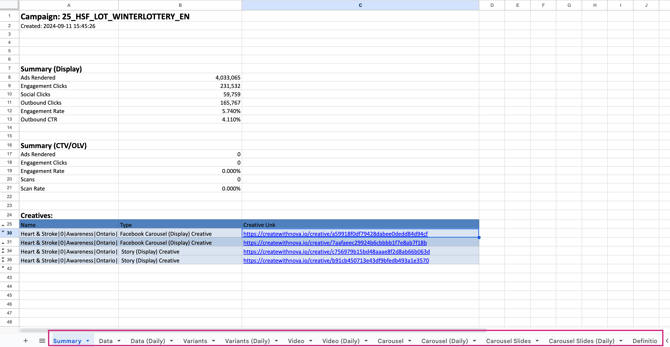
All Campaign Performance Reports include four standard tabs: Summary, Data, Data (Daily), and Definitions. Additional tabs will appear based on the ad formats used in your campaign, including Carousel, Photo, Stories, and Video.
****
**The following tabs are available for all campaigns:**
Summary Tab
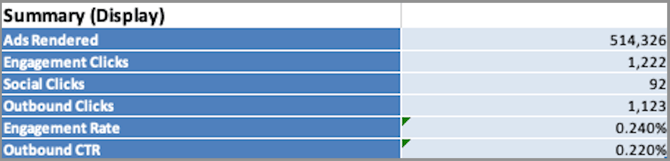
The Summary tab is broken into three sections:
- Campaign details: Campaign name, creation date, creator email, and campaign link
- Campaign overview: Performance metrics including ads rendered, engagement clicks, social clicks, outbound clicks, engagement rate, and CTR
- Creative list: Each creative with its name, type, and link
Data Tab
A per-creative breakdown including creative name and GUID, ads rendered, engagement clicks, outbound clicks, CTR, social clicks, and post URL.
Data (Daily) Tab
Shows the same per-creative metrics as the Data tab, but breaks them down by day. Use this tab to track how individual creatives performed over time throughout your campaign.
Definitions Tab
Contains definitions and additional notes for every metric in the Campaign Performance Report.
**The following tabs will appear based on the ad formats used in your campaign:**
Carousel Tab
Per-creative metrics including creative name and GUID, slide count, ads rendered, engagement clicks, CTR, social clicks, social interaction rate, outbound clicks, completion milestones (25%, 50%, 75%, 100%), 100% completion rate, and post URL.
Carousel (Daily) Tab
Shows the same per-creative metrics as the Carousel tab, broken down by day. Use this to identify which days had the highest carousel engagement and completion rates.
Carousel Slides Tab
A slide-level breakdown including sequence, impressions, clicks, CTR, and views within a 30-second window.
Carousel Slides (Daily) Tab
Shows the same slide-level metrics as the Carousel Slides tab, broken down by day.
**NOTE**: The Carousel tabs also apply to the Story ad format.
Video Tab
Per-creative video metrics including duration, video type, ads rendered, player loads, player load rate, video starts, video start rate, second-by-second views (1s–10s), and completion milestones (25%, 50%, 75%, 95%, 100%).
Video (Daily) Tab
Shows the same video metrics as the Video tab, broken down by day. Use this to monitor daily trends such as view rates and completion milestones.
---
### Metrics and Definitions
| **Metric** | **Definition** |
| --- | --- |
| Ads Rendered | The number of ad requests to Nova that are rendered on screen. |
| Engagement Clicks | Number of times a user clicks on an ad. |
| Engagement Rate | Overall engagement rate |
| Outbound Clicks | Number of times a user clicks through to the destination URL. |
| Outbound CTR | Outbound Click Through Rate |
| Social Clicks | Number of times a user clicks on a social action. |
| Social Interaction Rate | Social icon/button interaction rate |
| Scans | The count of scans of (or clicks on) an independent call-to-action element present in the ad. |
| Scan Rate | Scan Through Rate |
| Player Loads | The number of times the video player was loaded. |
| Player Load Rate | The number of Player Loads divided by the number of Ads Rendered. |
| Video Starts | The number of times the video started to play. Note that a maximum of one video start event is counted per ad rendered. |
| Video Start Rate | The number of Video Starts divided by the number of Player Loads. |
| Ns Views | The number of Video Starts that passed the N-second total playback time. The following N-second thresholds are provided: 1, 2, 3, 5, 7, 9, 10, and 15. |
| Ns View Rate | The number of Ns Views divided by the number of Video Starts. |
| N% Completions (Video) | The number of Video Starts that passed the N-percent total playback time threshold. The length of the individual video is used for this calculation. The following N-percent thresholds are provided: 25%, 50%, 75%, 95%, and 100%. |
| N% Completion Rate (Video) | The number of N% Completions (the number of times the video played through until the N% mark) divided by the number of Video Starts. |
| N% Completions (Carousel) | Count of N% of Slides |
| 100% Completion Rate (Carousel) | Proportion of carousel completion |
Still having any questions regarding campaign report? Send us your request to [support@createwithnova.com](mailto:support@createwithnova.com)
- [User Management](https://help.novastudio.ai/user-management?hsLang=en)
- [High-impact Display](https://help.novastudio.ai/high-impact-display?hsLang=en#main-content)
- [Setup & Basics](https://help.novastudio.ai/high-impact-display?hsLang=en#setup-basics)
- [Create Ad](https://help.novastudio.ai/high-impact-display?hsLang=en#create-ad)
- [Ad Formats & Capabilities](https://help.novastudio.ai/high-impact-display?hsLang=en#ad-formats-capabilities)
- [Features](https://help.novastudio.ai/high-impact-display?hsLang=en#features)
- [Import & Download](https://help.novastudio.ai/high-impact-display?hsLang=en#import-download)
- [Troubleshoot](https://help.novastudio.ai/high-impact-display?hsLang=en#troubleshoot)
- [VAST Video](https://help.novastudio.ai/vast-video?hsLang=en#main-content)
- [Setup & Basics](https://help.novastudio.ai/vast-video?hsLang=en#setup-basics)
- [Ad Formats](https://help.novastudio.ai/vast-video?hsLang=en#ad-formats)
- [Features](https://help.novastudio.ai/vast-video?hsLang=en#features)
- [Activation](https://help.novastudio.ai/vast-video?hsLang=en#activation)
- [Trackers](https://help.novastudio.ai/trackers?hsLang=en#main-content)
- [Add & Manage](https://help.novastudio.ai/trackers?hsLang=en#add-manage)
- [Guidelines](https://help.novastudio.ai/trackers?hsLang=en#guidelines)
- [Reporting](https://help.novastudio.ai/reporting?hsLang=en#main-content)
- [Access & Export](https://help.novastudio.ai/reporting?hsLang=en#access-export)
- [Metrics & Discrepancies](https://help.novastudio.ai/reporting?hsLang=en#metrics-discrepancies)
- [Trafficking Guidelines](https://help.novastudio.ai/trafficking-guidelines?hsLang=en)
- [Best Practices](https://help.novastudio.ai/best-practices?hsLang=en)
- [Native Ads](https://help.novastudio.ai/native-ads?hsLang=en)
- [Case Studies](https://help.novastudio.ai/case-studies?hsLang=en)
[](http://www.novastudio.ai?hsLang=en)
[support@novastudio.ai](mailto:support@createwithnova.com)
```
```
Copyright © 2026, Nova
```json
{
"@context" : "https://schema.org",
"@type" : "VideoObject",
"contentUrl" : "https://4934439.fs1.hubspotusercontent-na1.net/hubfs/4934439/Downloading%20a%20campaign%20performance%20report%20V3%20FINAL.mp4",
"dateModified" : "2023-07-13T17:54:25.858Z",
"duration" : "PT1M36S",
"height" : 720,
"name" : "Downloading a campaign performance report V3 FINAL",
"thumbnailUrl" : "https://4934439.fs1.hubspotusercontent-na1.net/hubfs/4934439/Downloading%20a%20campaign%20performance%20report%20V3%20FINAL.mp4/medium.jpg",
"uploadDate" : "2023-07-13T17:54:19.512Z",
"width" : 1280
}
```