
What Is Auto-Fill Import?
Auto-Fill Import lets you turn any public social post into a Nova Studio ad. Simply paste the post's public URL and Nova Studio will automatically pull the creative assets to build your ad unit.
From a single import, your social post can be adapted into the following ad formats:
- CTV
- OLV
- Display
- DOOH
💡To verify a post is public, paste the URL into an incognito or private browser window where you're not logged in. If the content loads, the post is public and eligible for import.
Supported Platforms and Post Types
Auto-Fill Import supports public posts from the following social platforms:
| Platform | Post Types |
|
|
Photo, Video, Carousel, Event, Album |
|
|
Photo, Video, Carousel |
|
Tiktok |
Video |
|
Photo, Video, Carousel |
|
| X (formerly Twitter) | Photo, Video |
💡Learn how to copy a public post URL from each supported platform.
Unsupported Platforms and Post Types
Auto-fill import does not support the following platforms, post types, and content:
Platforms
-
Pinterest
- Snapchat
- X
- Threads
Post Types
- Stories
- Reposted influencer content
- Drafts or scheduled posts
Content Categories
- Alcohol
- Gambling
- Adult content
Content Categories
- Private posts or posts from private pages
- Geo-locked
- Age-restricted posts
- Sponsored or paid promotion
- Post created on Meta Ad Manager or Business Suite
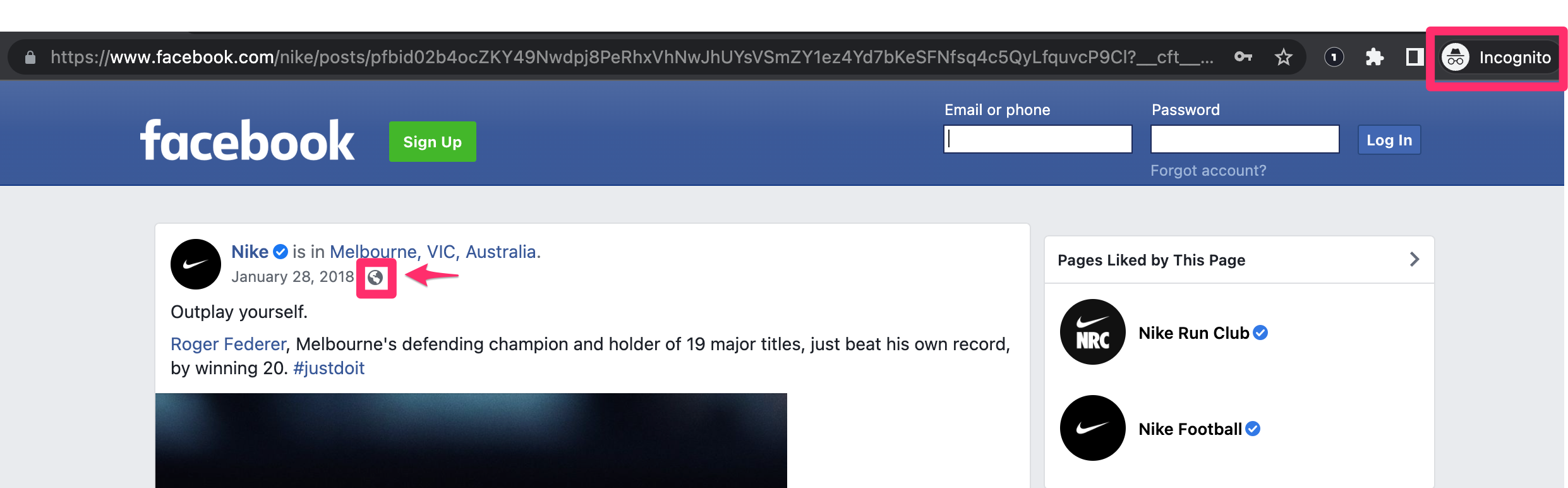
On Facebook: A Globe icon means the post is public. A Gear icon means a restriction is applied and the post cannot be imported.
Need Assistance with Post Creation?
If your post isn't supported by Auto-Fill Import or facing issues in creating a mockup, there are two other ways to create an ad in Nova Studio:
- Manual Upload: Upload the creative assets directly into Nova Studio. [Learn more →]
- Contact Support: Our team can help build your ad creative. [Submit request →]