---
title: How Do I Download TikTok Videos?
description: Learn how to download TikTok videos
---
[Skip to content](https://help.novastudio.ai/download-tiktok-videos#main-content)
[Ad Creative Build Request](https://help.novastudio.ai/kb-tickets/new?hsLang=en)
[](https://createwithnova.wiki/)
- [Login](https://create.novastudio.ai)
Open main navigation
Close main navigation
- [Login](https://create.novastudio.ai)
- [Ad Creative Build Request](https://help.novastudio.ai/kb-tickets/new)
- [Login](https://createwithnova.io/)
[Login](https://createwithnova.io/)
How can we help?
- There are no suggestions because the search field is empty.
1. [Nova Wiki](https://help.novastudio.ai/?hsLang=en)
2. [Display](https://help.novastudio.ai/display?hsLang=en)
3. [Import & Download](https://help.novastudio.ai/display?hsLang=en#import-download)
# How Do I Download TikTok Videos?
## Learn how to download TikTok videos.
Check this tutorial video on how to download TikTok videos
### Directly From Post
1. Navigate to the individual page of the TikTok post
2. Right-click on the video
3. Select **Download Video**
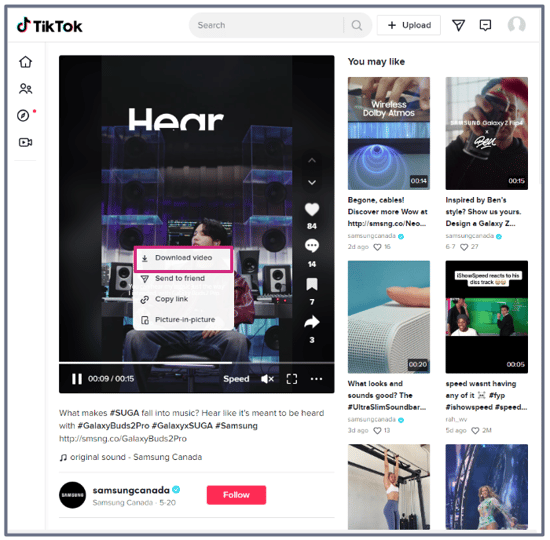
4. The video can nowbe used to [Add a Creative with Manual Asset Upload](https://knowledge.createwithnova.wiki/nova-manualasset)
### Third-Party Website
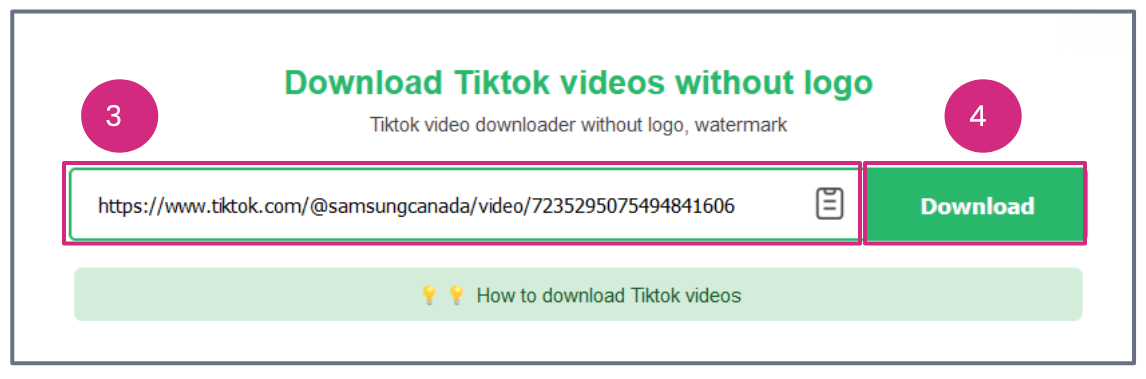
1. Copy the TikTok post URL
2. Open a third-party website like [TikTokDownload](https://tiktokdownload.online/), [SaveTik](https://savetik.co/en), [SSSTik](https://ssstik.io/en), or [SnapTik](https://snaptik.app/)
3. Paste the URL into the field (SaveTik used in example)
4. Click on **Download** and wait for the video to load
5. Select **Download Video File
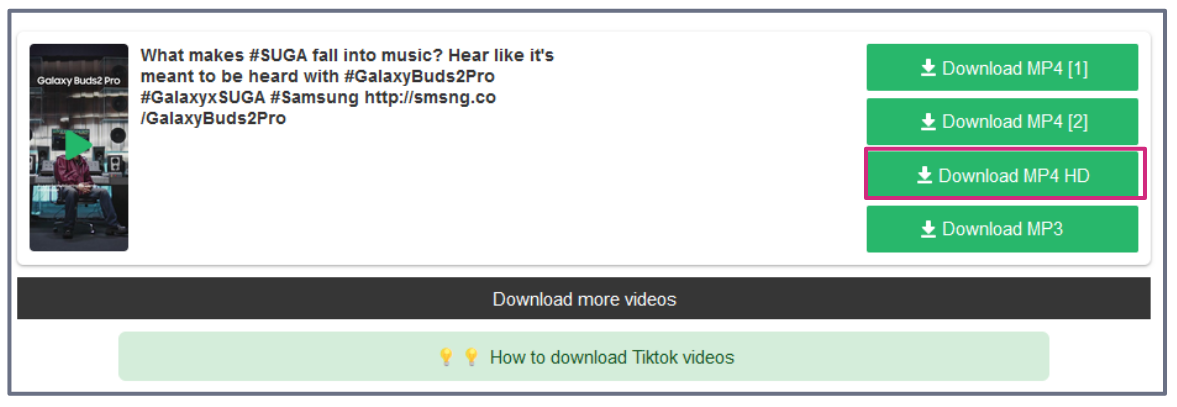**
6. The file will automatically download as a MP4
7. The video can now be used to [Add a Creative with Manual Asset Upload](https://createwithnova.wiki/nova-manualasset)
Learn more [here](https://www.loom.com/share/51d9eb6bd95e4c84a88d088aeb709afe).
Learn how to Download [Photos](https://createwithnova.wiki/downloading-an-image) and Videos from [Facebook](https://createwithnova.wiki/download-facebook-videos), [X (formerly Twitter)](https://createwithnova.wiki/download-twitter-videos), [Instagram](https://createwithnova.wiki/download-instagram-videos), [LinkedIn](https://createwithnova.wiki/download-linkedin-videos), [Youtube](https://createwithnova.wiki/download-youtube-videos), and [Pinterest](https://createwithnova.wiki/download-pinterest-videos).
Still facing an issue downloading a TikTok video? Send us your request to [support@createwithnova.com](mailto:support@createwithnova.com)
- [User Management](https://help.novastudio.ai/user-management?hsLang=en)
- [Display](https://help.novastudio.ai/display?hsLang=en#main-content)
- [Setup & Basics](https://help.novastudio.ai/display?hsLang=en#setup-basics)
- [Create Ad](https://help.novastudio.ai/display?hsLang=en#create-ad)
- [Ad Formats & Capabilities](https://help.novastudio.ai/display?hsLang=en#ad-formats-capabilities)
- [Features](https://help.novastudio.ai/display?hsLang=en#features)
- [Import & Download](https://help.novastudio.ai/display?hsLang=en#import-download)
- [Troubleshoot](https://help.novastudio.ai/display?hsLang=en#troubleshoot)
- [VAST Video](https://help.novastudio.ai/vast-video?hsLang=en#main-content)
- [Setup & Basics](https://help.novastudio.ai/vast-video?hsLang=en#setup-basics)
- [Ad Formats](https://help.novastudio.ai/vast-video?hsLang=en#ad-formats)
- [Features](https://help.novastudio.ai/vast-video?hsLang=en#features)
- [Activation](https://help.novastudio.ai/vast-video?hsLang=en#activation)
- [Trackers](https://help.novastudio.ai/trackers?hsLang=en#main-content)
- [Add & Manage](https://help.novastudio.ai/trackers?hsLang=en#add-manage)
- [Guidelines](https://help.novastudio.ai/trackers?hsLang=en#guidelines)
- [Reporting](https://help.novastudio.ai/reporting?hsLang=en#main-content)
- [Access & Export](https://help.novastudio.ai/reporting?hsLang=en#access-export)
- [Metrics & Discrepancies](https://help.novastudio.ai/reporting?hsLang=en#metrics-discrepancies)
- [Trafficking Guidelines](https://help.novastudio.ai/trafficking-guidelines?hsLang=en)
- [Best Practices](https://help.novastudio.ai/best-practices?hsLang=en)
- [Native Ads](https://help.novastudio.ai/native-ads?hsLang=en)
- [Case Studies](https://help.novastudio.ai/case-studies?hsLang=en)
[](http://www.novastudio.ai?hsLang=en)
[support@novastudio.ai](mailto:support@createwithnova.com)
```
```
Copyright © 2026, Nova
```json
{
"@context" : "https://schema.org",
"@type" : "VideoObject",
"contentUrl" : "https://4934439.fs1.hubspotusercontent-na1.net/hubfs/4934439/TikTok%203rd%20party%20FINAL.mp4",
"dateModified" : "2023-07-01T00:13:48.937Z",
"duration" : "PT31.134S",
"height" : 720,
"name" : "TikTok 3rd party FINAL",
"thumbnailUrl" : "https://4934439.fs1.hubspotusercontent-na1.net/hubfs/4934439/TikTok%203rd%20party%20FINAL.mp4/medium.jpg",
"uploadDate" : "2023-07-01T00:13:39.606Z",
"width" : 1280
}
```