---
title: How to Add Click Trackers in Social Display Creative
description: Download One Pager Info about trackers here Check this tutorial video on ad tags Read more about To avoid double counting, please make sure you are not adding the trackers to the DSP/Ad server, if y
---
[Skip to content](https://help.novastudio.ai/click-trackers#main-content)
[Ad Creative Build Request](https://help.novastudio.ai/kb-tickets/new?hsLang=en)
[](https://createwithnova.wiki/)
- [Login](https://create.novastudio.ai)
Open main navigation
Close main navigation
- [Login](https://create.novastudio.ai)
- [Ad Creative Build Request](https://help.novastudio.ai/kb-tickets/new)
- [Login](https://createwithnova.io/)
[Login](https://createwithnova.io/)
How can we help?
- There are no suggestions because the search field is empty.
1. [Nova Wiki](https://help.novastudio.ai/?hsLang=en)
2. [Trackers](https://help.novastudio.ai/trackers?hsLang=en)
3. [Add & Manage](https://help.novastudio.ai/trackers?hsLang=en#add-manage)
# How to Add Click Trackers in Social Display Creative
Download One Pager Info about trackers [here](https://help.novastudio.ai/hubfs/Nova%203rd%20Party%20Tracking%20Specifications%20(5).pdf?hsLang=en)
---
Check this tutorial video on ad tags
#### **The most common Click Trackers are:**
- [Google Campaign Manager (GMP/CM360)](https://help.novastudio.ai/click-trackers#dcm)
- [Google Ad Manager (GAM)](https://help.novastudio.ai/click-trackers#gam)
Read more about
- [Types of Click Tracker Implementation](https://help.novastudio.ai/click-trackers#types-of-click-tracker-implementation)
- [How clicks work in Nova formats](https://createwithnova.wiki/nova-clicks)
- [Click Trackers vs Destination (CTA) URLs](https://help.novastudio.ai/click-trackers#ctVsLp)
- [Mismatch Between Click Tracker and Destination URL](https://help.novastudio.ai/click-trackers#mismatch)
- [Destination URL Credits Social Platform](https://help.novastudio.ai/click-trackers#lpcredit)
- [Multiple Click Trackers are Provided](https://help.novastudio.ai/click-trackers#multiplect)
- [CM360 Click Trackers and IAB TCF v2.0 Support (GDPR)](https://help.novastudio.ai/click-trackers#gdpr)
To avoid double counting, please make sure you are not adding the trackers to the DSP/Ad server, if you already adding it in the Nova platform
You can add the trackers **either** in the DSP or in Nova Platform, but not to both. We recommend adding them in Nova Platform.
Any changes to the following require updates in the Nova Creative UI and **a NEW ad tag to be generated and trafficked**:
- Impression trackers
- Click trackers
- IAS/MOAT/DoubleVerify trackers (if added to the Injection Code field)
### Implementing Third-Party Click Trackers
Two different click tracker applications are supported in the Nova platform.
1. **Adding third-party trackers to the “Click tracker" field in the Nova platform:**
This is the standard and recommended practice. The trackers will track Engagement Clicks. As a result, the CM360 (or any other tracker) numbers will closely match the click numbers reported by the DSP.
-png.png?width=688&height=153&name=Screenshot%20(2149)-png.png)
2. **Adding third-party trackers directly on the Landing Page URL field:**
This will ensure that the CM360 (or any other click tracker) counts ONLY the clicks that lead to the Landing Page - also known as "Outbound Clicks". No other type of click on the ad is counted by the click tracker. As a result, the DSP numbers will not match the numbers tracked by the third-party trackers since DSP typically tracks the Engagement click on the ad (the first unique click on the ad)
-png.png?width=688&height=415&name=Screenshot%20(1604)-png.png)
**Note:** This will not work for third-party trackers that **do not** redirect to the landing page URL.
### Google Campaign Manager (GMP / CM360)
- The most common type of click tracker
***Click Tag***
```
https://ad.doubleclick.net/ddm/trackclk/N636.285985MEDIAIQ/B20586548.260746160;dc_trk_aid=456683171;dc_trk_cid=124904844;dc_lat=;dc_rdid=;tag_for_child_directed_treatment=;tfua=
```
**Note:** If the click tag contains **\[timestamp\]** – it can be left as is
- Add the URL in the Nova Creative UI
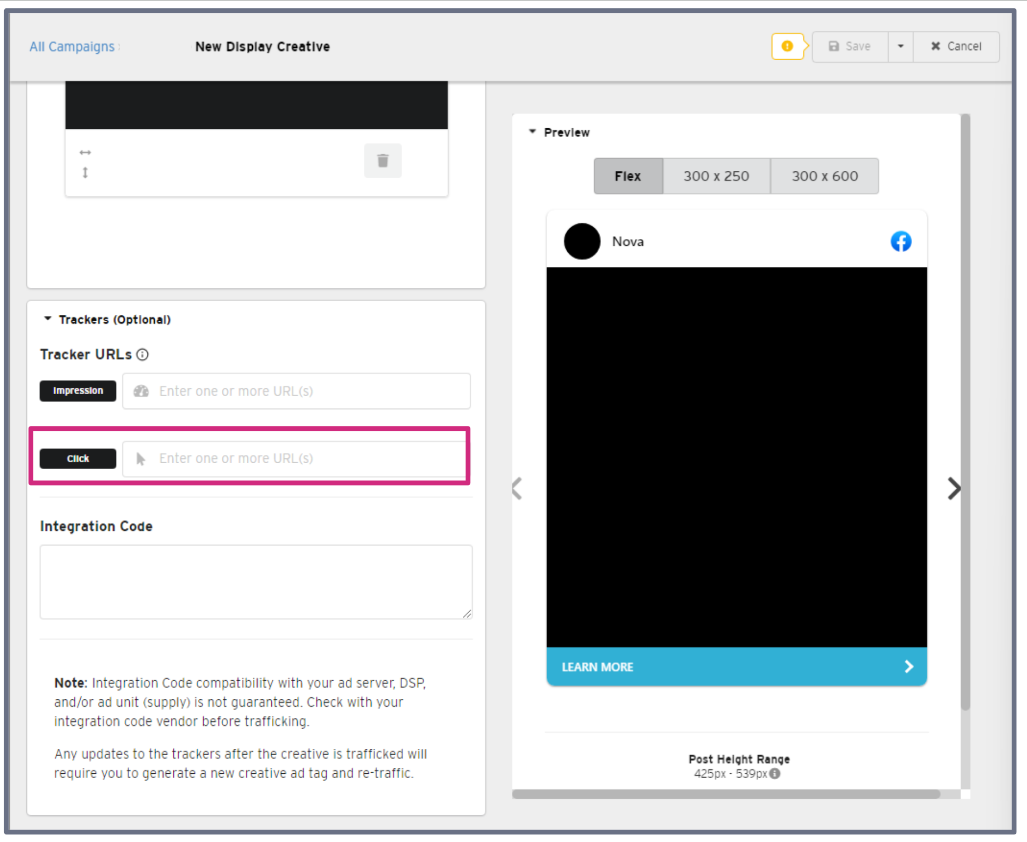
**Note:** You can easily tell if the URL is a *click* tracker (vs. an *impression* tracker) if you spot **/ddm/trackclk** in the URL
### Google Ad Manager (GAM)
- Another common click tracker
***Click Tag***
```
https://pubads.g.doubleclick.net/gampad/clk?id=5084912393&iu=/5268/jn.pt/Clickcommand
```
**Note:** If the click tag contains \[timestamp\] – it can be left as is
- Add the URL in the Nova Creative UI
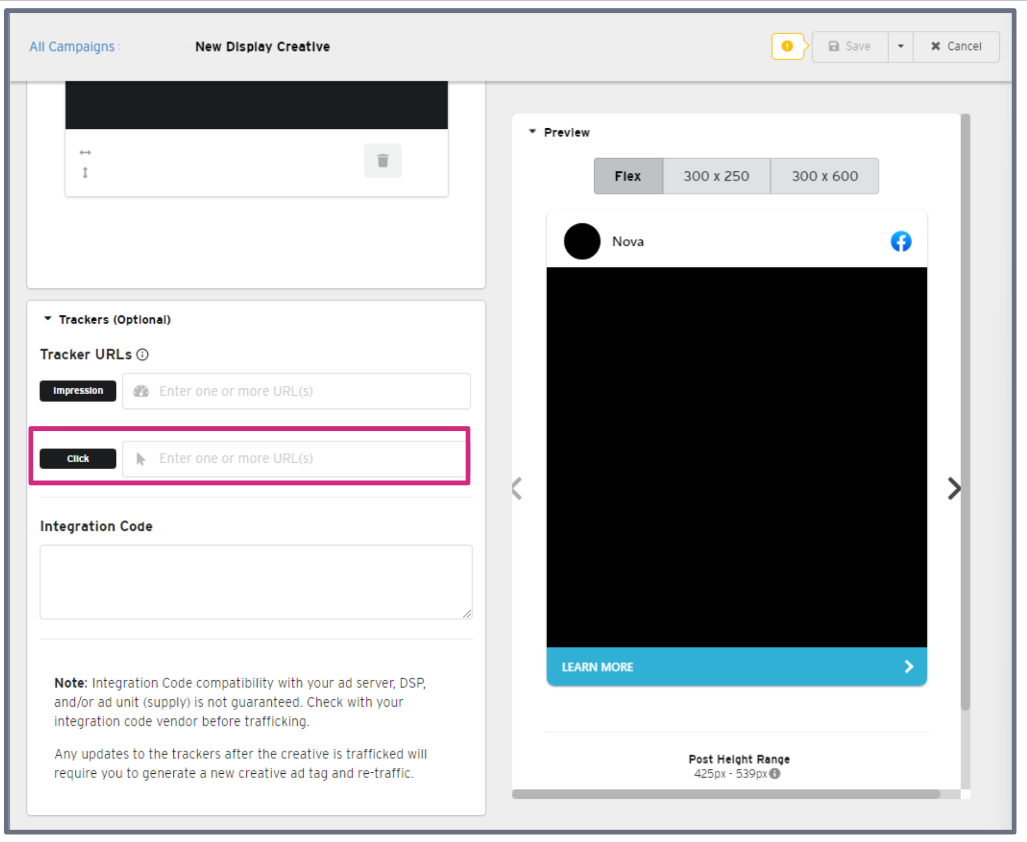
**Note:** Some GAM click trackers do not properly redirect to a webpage. In cases like this please do not add the Click tracker to the landing page URL field. Instead add the tracker to the Click tracker field and add the actual landing Page URL in the Landing page URL field.
### Click Trackers vs Landing Page URLs
- Landing Page URL is the primary destination page where the consumer is taken when the ad is clicked
**Note:** The destination URL is known as the **Landing Page URL** in the Nova Creative UI
- If provided with a **click tracker only**, use the URL that the click tracker redirects to as the Landing Page URL
- Then add the tracker URL as a standard click tracker in the Nova Creative UI
*Example Scenario:*
(1) Click tracker:
```
https://ad.doubleclick.net/ddm/trackclk/N778265.1270091PUBLISHER.FR/B23524584.260447267;dc_trk_aid=456414509;dc_trk_cid=124655216;dc_lat=;dc_rdid=;tag_for_child_directed_treatment=;tfua=
```
(2) Click tracker redirects to:
```
https://www.advertiser.com/vehicules/corsa-f/vue-d-ensemble.html?systeme=displaydisplayclassic&mission=Corsa&utm_campaign=Corsa23716@&utm_source=Mediacom&utm_publisher=publisher&utm_medium=display&utm_format=pagepostphoto&utm_creative=NewCorsa&moi=Corsa&cid=D_23524584_260447267_456414509_NewCorsa-pagepostphoto@248274@
```
- For the above scenario:
- The Landing Page URL of the creative should be (2) above
- The tracker (1) above should be added as a standard click tracker in the Nova UI

***Example GAM click tracker:***
(1) Click tracker:
```
https://pubads.g.doubleclick.net/gampad/clk?id=5084912393&iu=/5268/jn.pt/Clickcommand
```
(2) It does not redirect to anywhere
(3) Ask the partner for an appropriate landing page destination to add to the Landing Page URL
(4) Add the click tracker to the click tracker field
### Mismatch Between Click Tracker and Destination URL
- The Landing Page URL provided by the client may not be the same as the final page URL the click tracker redirects to
- Clarify which URL should be used
- The URL which the click tracker redirects to is generally the correct one to use
- This is because it usually contains the UTM tracking parameters
*Example Scenario:*
(1) Click tracker:
```
https://ad.doubleclick.net/ddm/trackclk/N778265.1270091PUBLISHER.FR/B23524584.260447267;dc_trk_aid=456414509;dc_trk_cid=124655216;dc_lat=;dc_rdid=;tag_for_child_directed_treatment=;tfua=
```
(2) Click tracker redirects to:
```
https://www.advertiser.com/vehicules/corsa-f/vue-d-ensemble.html?systeme=displaydisplayclassic&mission=Corsa&utm_campaign=Corsa23716@&utm_source=Mediacom&utm_publisher=publisher&utm_medium=display&utm_format=pagepostphoto&utm_creative=NewCorsa&moi=Corsa&cid=D_23524584_260447267_456414509_NewCorsa-pagepostphoto@248 274@
```
(3) Destination (provided separately):
```
https://www.advertiser.com/vehicules/corsa-f/vue-d-ensemble.html
```
- For the above scenario:
1. The destination of the creative should be (2)
2. The tracker (1) should be added as a standard click tracker in the Nova Creative UI

**Note:** Remember to notify the partner of the change
### Landing Page URL Credits Social Platform
- The Landing Page URL may contain a UTM parameter that gives credit to a social platform (e.g. Facebook).
- This should be changed to the name of the publisher/agency
*Example Scenario:*
(1) Destination provided:
```
https://www.advertiser.com/vehicules/corsa-f/vue-d-ensemble.html?utm_source=facebook
```
(2) Destination updated to:
```
https://www.advertiser.com/vehicules/corsa-f/vue-d-ensemble.html?utm_source=telegraph
```
- For the above scenario:
1. The Landing Page URL (1) gives credit to a social platform (**e.g.?UTM\_source=facebook**)
2. It is changed in (2) to credit your publisher or agency (**e.g.?UTM\_source=telegraph**)
3. Notify the client of the change
### Multiple Click Trackers are Provided
- Verify the following:
- If the trackers all redirect to the same page
- If they match the destination page URL (if provided separately)
- If not all of them match, clarify with the client which one should be used
- Multiple click trackers are supported in the Nova Creative UI
**Warning:** Do not add a click tracker to both the Landing Page URL AND click tracker field. This will double-count clicks!
### CM360 Click Trackers and IAB TCF v2.0 Support (GDPR)
- Google Campaign Manager Click tracking tags recently added support for the IAB
Transparency & Consent Framework v2.0 (IAB TCF v2.0)
- Campaign Manager can receive and pass on user permissions dictating if the users can be added to remarketing lists and attribution reports
- The consent data is included in the Campaign Manager click tracking URLs in the form of macros such as:
```
gdpr=${GDPR};gdpr_consent=${gdpr_consent_755}
```
*Example CM360 Click Tracking URL with GDPR Macros applied:*
```
https://ad.doubleclick.net/ddm/trackclk/N234004.2466709TIMEOUTNY/B24632473.282556380;dc_trk_aid=477909821;dc_trk_cid=137970972;dc_lat=;dc_rdid=;tag_for_child_directed_treatment=;tfua=;gdpr=${GDPR};gdpr_consent=${GDPR_CONSENT_755}
```
- Publishers operating in the European Economic Area:
- Campaign Manager will not track users if not provided consent
- Ad events where the above macros are missing will not be tracked
**Note:** If the GDPR macros are missing the click event is still valid and will be counted, the user will just not be added to attribution reports or remarketing lists
- To ensure that the new GDPR consent macros are properly passed on to Campaign Manager for Social Display creatives
- Add the click tracking URL to the 'Trackers' section on the Creative page (as specified above) - no other action is required

Having any questions or facing an issue in adding click trackers? Send us your request to [support@createwithnova.com](mailto:support@createwithnova.com)
- [User Management](https://help.novastudio.ai/user-management?hsLang=en)
- [Display](https://help.novastudio.ai/display?hsLang=en#main-content)
- [Setup & Basics](https://help.novastudio.ai/display?hsLang=en#setup-basics)
- [Create Ad](https://help.novastudio.ai/display?hsLang=en#create-ad)
- [Ad Formats & Capabilities](https://help.novastudio.ai/display?hsLang=en#ad-formats-capabilities)
- [Features](https://help.novastudio.ai/display?hsLang=en#features)
- [Import & Download](https://help.novastudio.ai/display?hsLang=en#import-download)
- [Troubleshoot](https://help.novastudio.ai/display?hsLang=en#troubleshoot)
- [VAST Video](https://help.novastudio.ai/vast-video?hsLang=en#main-content)
- [Setup & Basics](https://help.novastudio.ai/vast-video?hsLang=en#setup-basics)
- [Ad Formats](https://help.novastudio.ai/vast-video?hsLang=en#ad-formats)
- [Features](https://help.novastudio.ai/vast-video?hsLang=en#features)
- [Activation](https://help.novastudio.ai/vast-video?hsLang=en#activation)
- [Trackers](https://help.novastudio.ai/trackers?hsLang=en#main-content)
- [Add & Manage](https://help.novastudio.ai/trackers?hsLang=en#add-manage)
- [Guidelines](https://help.novastudio.ai/trackers?hsLang=en#guidelines)
- [Reporting](https://help.novastudio.ai/reporting?hsLang=en#main-content)
- [Access & Export](https://help.novastudio.ai/reporting?hsLang=en#access-export)
- [Metrics & Discrepancies](https://help.novastudio.ai/reporting?hsLang=en#metrics-discrepancies)
- [Trafficking Guidelines](https://help.novastudio.ai/trafficking-guidelines?hsLang=en)
- [Best Practices](https://help.novastudio.ai/best-practices?hsLang=en)
- [Native Ads](https://help.novastudio.ai/native-ads?hsLang=en)
- [Case Studies](https://help.novastudio.ai/case-studies?hsLang=en)
[](http://www.novastudio.ai?hsLang=en)
[support@novastudio.ai](mailto:support@createwithnova.com)
```
```
Copyright © 2026, Nova
```json
{
"@context" : "https://schema.org",
"@type" : "VideoObject",
"contentUrl" : "https://4934439.fs1.hubspotusercontent-na1.net/hubfs/4934439/Click%20Trackers%20V2%20FINAL.mp4",
"dateModified" : "2023-07-06T15:17:11.143Z",
"duration" : "PT3M37S",
"height" : 720,
"name" : "Click Trackers V2 FINAL",
"thumbnailUrl" : "https://4934439.fs1.hubspotusercontent-na1.net/hubfs/4934439/Click%20Trackers%20V2%20FINAL.mp4/medium.jpg",
"uploadDate" : "2023-07-06T15:17:04.101Z",
"width" : 1280
}
```